How To create a mood board
A mood board is curated visual collection of colors, images, patterns, and textures that sets or defines the style or feel for a creative project.
Mood boarding can be done for all types of creative projects. I use them for visual brand identity and website projects as this helps ensure alignment with what my client is visually wanting and it saves me time.
Why and How to use a mood board
The mood boards I create help me align with my client’s vision for their branding and/or website projects. I use them to confirm the visual direction and as a reference and guidance for when I’m in production. They create and provide efficiency and clarity in my projects.
I’ve also used mood boards for redoing a bathroom in our home, other interior design projects and for personal creative projects. It’s a supportive way to initiate the project and to get those creative juices flowing.
the 1st step in mood boarding
The very first thing you want to do is to identify 3-5 words that describe your creative project. For example, when I work on a visual brand identity project with clients, we determine 5 descriptive words for their brand. A recent project used these words: Creative, Whimsical, Inspiring, Professional, and Fun.
Think about the words you’d use to describe your project. I recently renovated our guest bathroom, and the words I used for the project: Calm, Warm, and Inviting. That's how I wanted guests to feel when they entered that bathroom.
You’ll use these words to steer the direction of the mood board, I will show you how to do this in a couple of minutes.
How to create a Mood board
You can create digital or an analog (aka by hand) mood board. Digital mood boards are easier because you don’t need to print anything (I don’t know about you, but my printer always seems to be on the fritz!) and you don’t need supplies (scissors, glue sticks, etc.). But if you have access to loads of magazines, an analog one would be fun and satisfying to make.
For a digital mood board, I usually start with Pinterest by creating a new board. Starting with Pinterest allows me to search and quickly save images that match the vibe I’m looking for. Milanote is another great option.
What images and elements to include on my mood board?
You’ll want to include:
Color palettes
Typography
Texture
Patterns
Illustrations
Shapes
Images that capture the vibe or style you’re going for
Going back to my example earlier on a recent client project, their brand words were: Creative, Whimsical, Inspiring, Professional, and Fun.
I’ll begin to search for those words on Pinterest. For example, I’ll search “whimsical and fun typefaces”, “Creative and fun color palettes”, “inspiring and whimsical patterns”. I try not to over think anything here, and pin images that catch my eye.
When I’m done pinning images, I’ll review and refine them. I look for similarities and cohesion among all of the images, and will unpin the ones that don’t match the rest. Sometimes I’ll create another board and repin images there.
Putting the mood board together
I save and download the remaining images from the Pinterest board, and add them to Figma. This is my preferred design tool, and I do most of my work in Figma. You can use Canva, Adobe Firefly, Milanote, there are a lot of options out there. Use a tool that you’re most comfortable with.
The layout of my mood boards varies, but I usually like some structure to them. Below is an example of a mood board for that client project whose brand words were: Creative, Whimsical, Inspiring, Professional, and Fun.
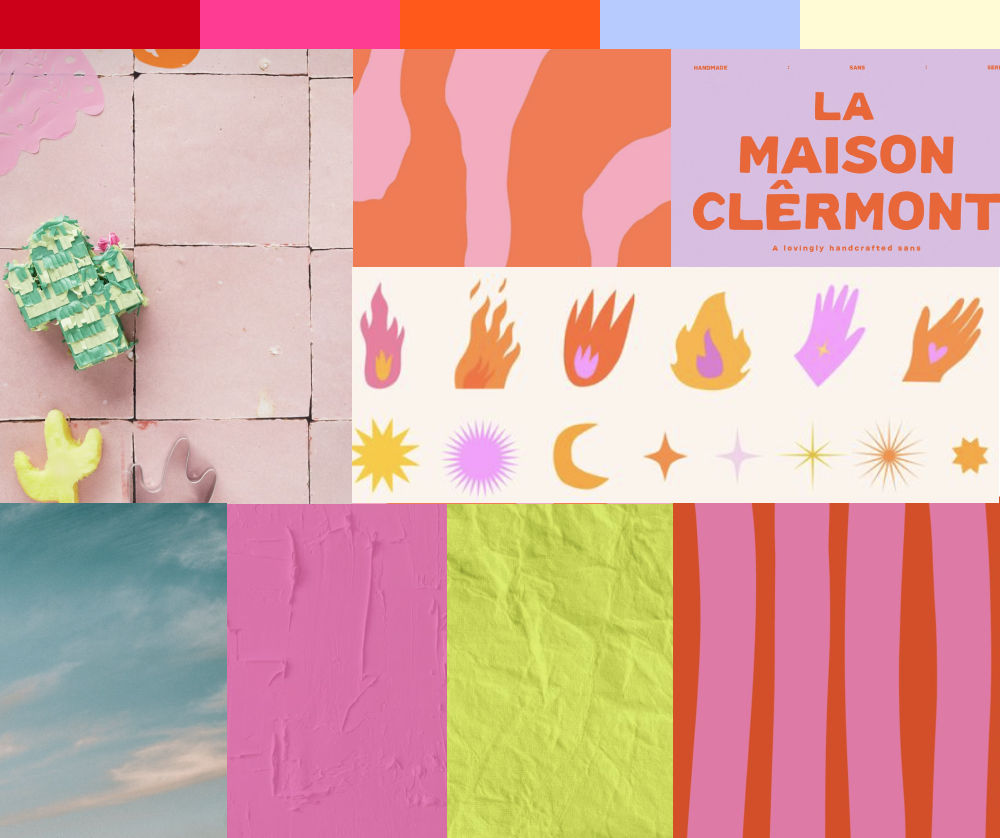
All images sourced from Pinterest.
However, you can structure or not structure your mood board. I think the layout also speaks to the “mood”/”feel” of the board. So in the example above, I think the layout is “professional” and that’s one of their brand words.
Ok that’s all I have for creating your mood board. Remember to have fun <3